
Current Windows release
Odin3 v3.14.4
Latest
| File name | Odin3_v3.14.4.zip |
|---|---|
| File size | 4.30 MB (4,510,751 bytes) |
| Operating system | Windows 7, 8, 10, and 11 |
| Archive checked | September 4, 2026 |
f68e3aa298ab44400afd0e7d0492aa6d818bea1ad6899e21b569e01a2c757473Source notice: the Odin ZIP is hosted by a third-party website, not Samsung. We checked the URL, response, archive structure, size, and checksum shown here. Scan the file again before opening it.
Free
No purchase required
Windows
Portable desktop utility
Galaxy
Samsung firmware only
Direct ZIP
No download timer
What is Odin Flash Tool?
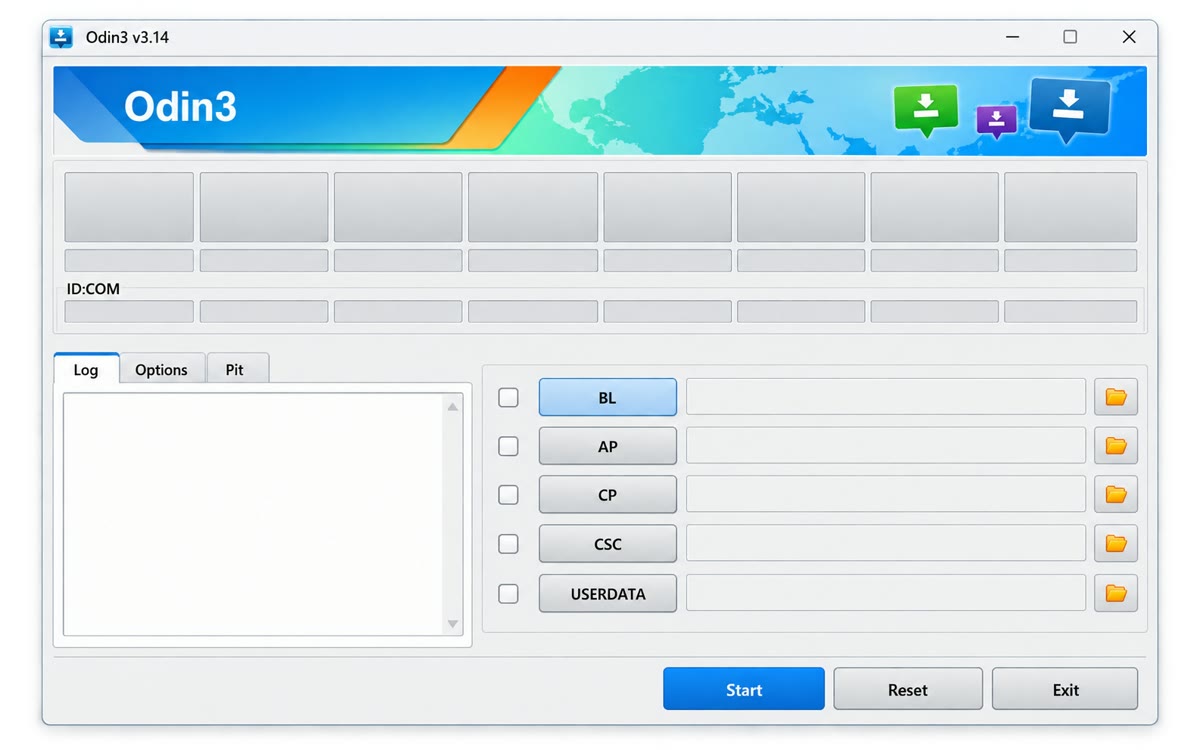
Odin is a Windows utility commonly used to install Samsung firmware packages on compatible Galaxy phones and tablets. It communicates with a device in Download Mode and loads separate firmware components into labelled slots.
Install stock firmware
Load an exact, model-matched Samsung firmware package when a documented update or recovery procedure requires it.
Recover software failures
A correct stock package may help recover some boot loops or failed updates. It cannot repair damaged hardware.
Choose CSC behavior
CSC normally performs a clean flash; HOME_CSC normally attempts to retain user data. Neither replaces a backup.
Important: Match the full model number, CSC, and bootloader revision. The wrong firmware can erase data or leave the device unable to start.
Odin versions
Use the current build unless a reliable, device-specific procedure requires another version. The complete archive is available on the Older Odin Versions page.
| Version | File | Size | Download |
|---|---|---|---|
| Odin3 v3.14.4 | Odin3_v3.14.4.zip | 4.30 MB | Download ZIP |
| Odin3 v3.14.1 | Odin3_v3.14.1.zip | 2.47 MB | Download ZIP |
| Odin3 v3.13.3 | Odin3_v3.13.3.zip | 2.47 MB | Download ZIP |
| Odin3 v3.13.1 | Odin3_v3.13.1.zip | 2.53 MB | Download ZIP |
How to use Odin Flash Tool
- Record the exact model and CSC. In Settings → About phone, record the full model, build, CSC, and Android version.
- Back up important data. Save anything you cannot replace and charge the phone above 60%.
- Install the Samsung USB driver. Restart Windows if requested and close Smart Switch before opening Odin.
- Download, verify, and extract Odin. Compare the checksum, scan the archive, and never run Odin from inside the ZIP.
- Download one matching firmware package. Match the full model, CSC, and bootloader revision; never mix package files.
Frequently asked questions
What is the Odin flash tool?
Odin is a Windows utility commonly used to load Samsung firmware packages onto compatible Galaxy phones and tablets. It can support stock firmware updates and some recovery workflows.
Does Get Odin Tool host a download?
Get Odin Tool links to a third-party Odin ZIP and identifies its host, size, archive contents, and SHA-256 checksum. Samsung does not operate a public consumer Odin download page.
What files does Odin use?
Odin commonly loads Samsung-compatible .tar or .tar.md5 packages into BL, AP, CP, and CSC slots. All files must match the exact device and come from one firmware package.