
For years, if you wanted to flash firmware on a Samsung Galaxy phone, you used Odin. There wasn’t much of a choice. In 2026, that changed when an open-source tool called Brokkr showed up on GitHub.
Both tools flash the same firmware files, and both put the phone through the same Download Mode. So which one should you use? In this post, I will compare them feature by feature and tell you which one I’d pick for each situation.
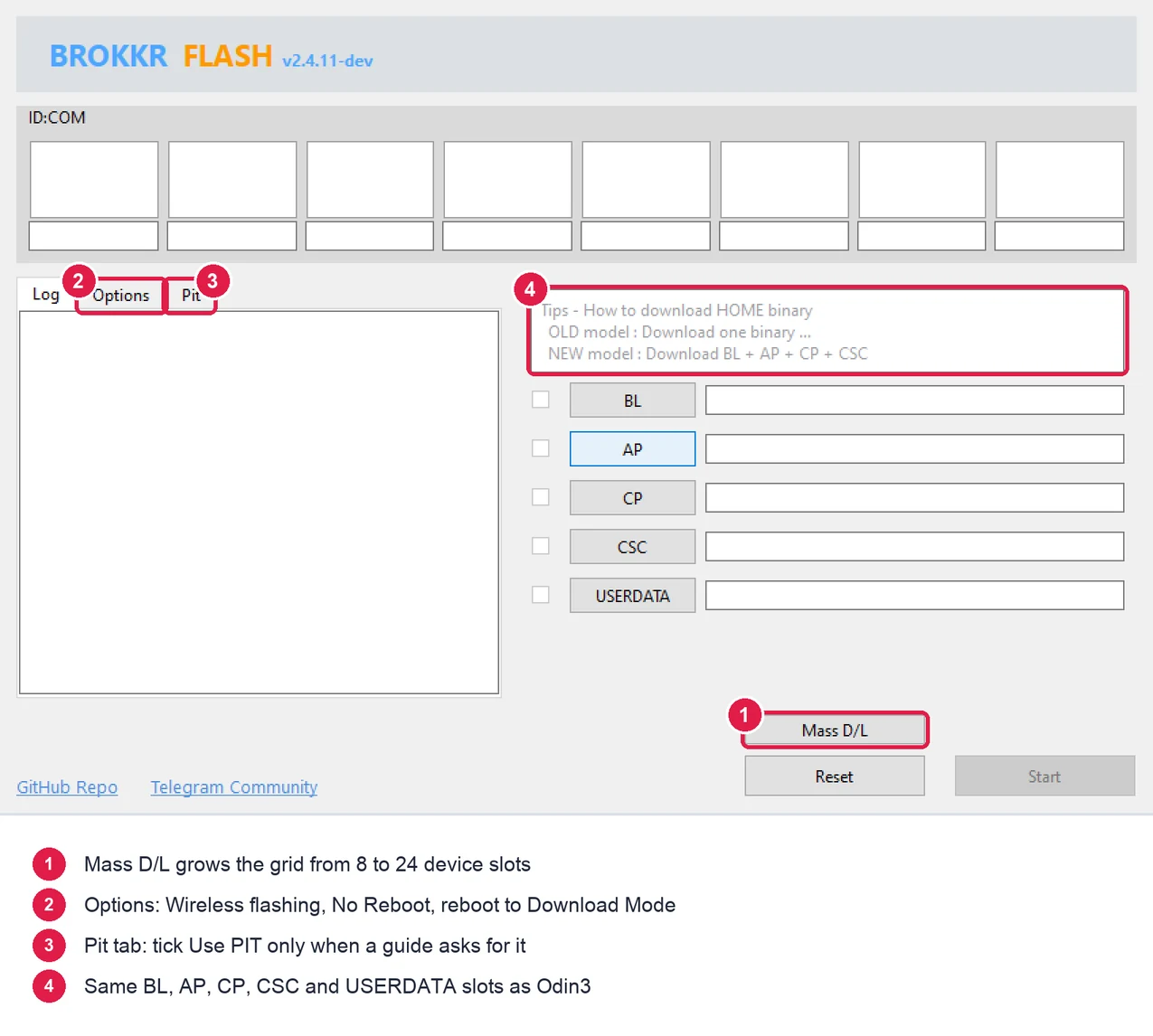
The short answer
If you’re on a Mac or Linux PC, use Brokkr. Odin3 simply doesn’t run there.
If you’re on Windows and just want to flash stock firmware, both work fine. I’d still keep Odin around for the few jobs Brokkr can’t do yet, like a Nand Erase or a forced re-partition.
There’s more to it, though. Let me explain.
What are Odin and Brokkr?
Odin is Samsung’s own flashing tool. It was never meant for the public. It was built for service centers and factories, and copies leaked online years ago. It’s closed source, it only runs on Windows, and the newest build you can get, Odin3 v3.14.4, dates back to January 2020.
Brokkr is a separate program written from scratch by an independent developer, Gabriel2392. The first stable version came out on April 28, 2026, and the latest one, v2.4.10, landed on September 17, 2026. The code is public on GitHub under the GPL v3 license, and it runs on Windows, macOS, Linux and Android.
Brokkr isn’t a modded Odin. It just speaks the same protocol, which is why it can flash the exact same files.
Brokkr vs Odin comparison table
| Feature | Odin3 v3.14.4 | Brokkr v2.4.10 |
|---|---|---|
| Made by | Samsung (internal tool, leaked) | Gabriel2392 (independent, open source) |
| Price | Free | Free |
| Source code | Closed | Public, GPL v3 |
| Windows | Yes | Yes, x64 and ARM64 |
| macOS | No | Yes, Apple Silicon and Intel |
| Linux | No | Yes, x86_64 and ARM64 |
| Android app | No | Yes, some devices only |
| Firmware files | BL, AP, CP, CSC, USERDATA | BL, AP, CP, CSC, USERDATA |
| USB driver on Windows | Samsung USB Driver | Samsung USB Driver (none on Mac or Linux) |
| Device boxes | 8, with Mass D/L | 8, Mass D/L expands to 24 |
| Compressed .lz4 images | Supported | Streams them without unpacking, up to 2x faster per the developer |
| Reboot into Download Mode from PC | No | Yes |
| Wireless flashing | No | Yes, mainly for Galaxy Watch |
| Command line mode | No | Yes |
| Nand Erase, Re-Partition, F. Reset Time | Yes | No |
| PIT file | Yes | Yes, in the Pit tab |
| Track record | More than a decade | Since April 2026 |
Odin details come from the Odin3 v3.14.4 files. Brokkr details come from its release page and source code. Checked on September 28, 2026.
Where Brokkr wins
It runs on any computer
This is the big one. Odin3 is Windows only. If you have a MacBook or a Linux laptop, you’d normally need a Windows PC, a virtual machine, or Heimdall, whose original project hasn’t had a new release since 2017.
Brokkr gives Mac and Linux users a proper native app. Better yet, you don’t have to install any USB driver on those systems.
It can be faster
Newer Samsung firmware packs its images as .lz4 files. According to the developer, Odin unpacks that data before sending it, while Brokkr sends the compressed data as is when the phone supports it. The developer says this makes flashing up to 2x faster.
I’d take that number as the best case. You can see which mode you got in the Brokkr log. It says Flashing (Speed: Enhanced) when it’s using the faster path, and Flashing (Speed: Normal) when it isn’t.
No more button combos
Brokkr has a Try to Reboot the device(s) into Download Mode button in the Options tab. If your phone is on and unlocked, and Auto Blocker is turned off, one click sends it into Download Mode.
That’s a lifesaver when a volume button is broken. Odin can’t do this. It only sees a phone that’s already in Download Mode.
More phones at once, and a command line
Both tools have Mass D/L. Odin shows 8 device boxes, while Brokkr grows from 8 to 24. It also has a command line mode, so repair shops and developers can script their flashes.
You can see the code
Odin is a leaked binary that gets reuploaded all over the internet. Brokkr’s code is public, and every release file is built by GitHub Actions right from that code. You know exactly where your copy came from.
Where Odin still wins
Advanced options
Odin’s Options tab has Nand Erase, Re-Partition and F. Reset Time. Brokkr has none of these as of v2.4.10.
Most people never touch them, and honestly, you shouldn’t unless a guide tells you to. But a few repair guides for bootloops and broken partitions do ask for them. For those jobs, you need Odin.
Years of testing
Odin has been the go-to Samsung flash tool for more than a decade. Brokkr is only a few months old. Its changelog is still full of fixes, like the v2.4.8 update that fixed flashing on the Galaxy S5 Neo and added clearer error messages.
That’s normal for a young project, and the updates come fast. But if you’re flashing a phone you can’t afford to lose, a tool with a long track record counts for something.
Every guide is written for it
Almost every flashing guide, XDA thread and YouTube video out there uses Odin. If you get stuck, it’s easier to find someone who’s hit the same problem. I’ve put the common ones in my Odin errors guide, and the full walkthrough in my Odin tutorial.
Which one should you use?
Here’s how I’d decide.
- You’re on a Mac or Linux PC: use Brokkr.
- You’re on Windows and flashing stock firmware to fix or update a phone: either works. Go with Odin if you want the tried and tested option, or Brokkr if you want the faster, open-source one.
- You need to flash a batch of phones: Brokkr, thanks to 24 device slots and the command line.
- Your volume buttons are broken: Brokkr, because it can reboot the phone into Download Mode for you.
- A guide asks for Nand Erase, Re-Partition or F. Reset Time: Odin.
- You’re flashing a Galaxy Watch over Wi-Fi: Brokkr.
You don’t really have to pick one forever. Both are free, and on Windows they use the same Samsung USB Driver. Just don’t run them at the same time, since only one program can talk to the phone.
Download links
I keep a checked copy of Odin3 v3.14.4 with its SHA-256 checksum on the Odin download page. If you need an older build for an old phone, look at older Odin versions.
For Brokkr, my Brokkr download guide has the official links for every platform, the checksums, and the full flashing steps.
Brokkr vs Odin questions
Is Brokkr better than Odin?
For most people, Brokkr does everything Odin does and runs on more computers. Odin is still better for advanced repair options like Nand Erase and Re-Partition, and it has a much longer track record.
Can Brokkr flash the same firmware as Odin?
Yes. Brokkr uses the same BL, AP, CP, CSC and USERDATA files in .tar or .tar.md5 format. You can take a firmware package made for Odin and load it in Brokkr without changing anything.
Is Brokkr made by Samsung?
No. Brokkr is an independent open-source project by a developer called Gabriel2392. Odin is Samsung’s internal tool. Neither one is officially offered to consumers by Samsung.
Is there an Odin for Mac?
No. Odin3 only runs on Windows. If you’re on a Mac, Brokkr is the easiest way to flash Samsung firmware, and it runs natively on both Apple Silicon and Intel Macs.
Is Brokkr really faster than Odin?
It can be. The developer says Brokkr can be up to 2x faster because it sends compressed .lz4 firmware data directly. That only works with firmware that uses .lz4 images and phones that support compressed download. Otherwise, the speed is about the same.
Does Brokkr need the Samsung USB Driver?
On Windows, yes. It uses the same driver as Odin. On macOS, Linux and Android, it doesn’t need a driver.
That’s it. Both tools will get the job done for a normal firmware flash. It mostly comes down to which computer you have and what you’re trying to fix.
Still not sure which one fits? Send me a message through the contact page with your Galaxy model number and what you’re trying to do, and I’ll point you to the right tool.